오늘은 애플 로그인 관련해 포스팅해보겠다.
애플로그인 API 연동 초기 설정은 이 블로그를 참고해서 설정해주었다.
https://tyrannocoding.tistory.com/65
[초간단] 애플 로그인 API 연동 초기 설정 하기
IOS 앱 배포를 위해 본인의 어플을 애플에 심사함에 있어, 소셜 로그인 기능을 사용하지만 애플 로그인이 없으면 reject사유가 되므로 전혀 고려하지 않은 애플 로그인을 만들게 되었습니다. 여러
tyrannocoding.tistory.com
먼저 로직을 간단히 설명해보겠다.
1. 클라이언트로 부터 identity token을 받아온다.
2. public key를 요청한다
3. public key 응답을 받는다. (key 배열을 뜻한다. 생성된 public key와 헷갈리가 때문에 본문에서는 key 배열이라고 칭하겠다.)
4. identity token을 검증한다.
5. 검증 완료 후 이메일과 sub 값을 db에 저장한다.(이후 로직은 상황마다 다름)
검증 과정을 자세히 살펴보자면 아래와 같다.
identity token 검증 과정
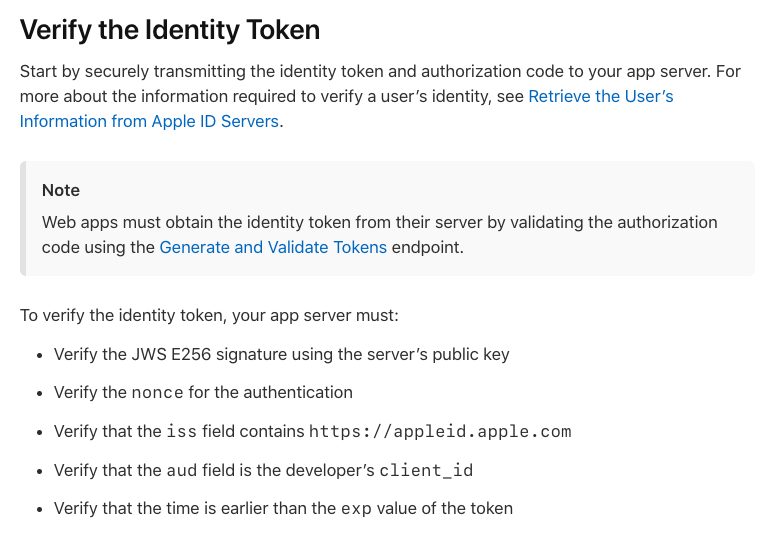
identity token내 payload에 속한 값들이 변조 되지 않았는지 검증하기 위해서는 애플서버의 public key를 사용해 JWS E256 signature를 검증해야한다.
key uri를 조회하면 다음과 같이 키 배열 응답 받을 것이다. 이 정보를 조합하여 public key를 생성한다.
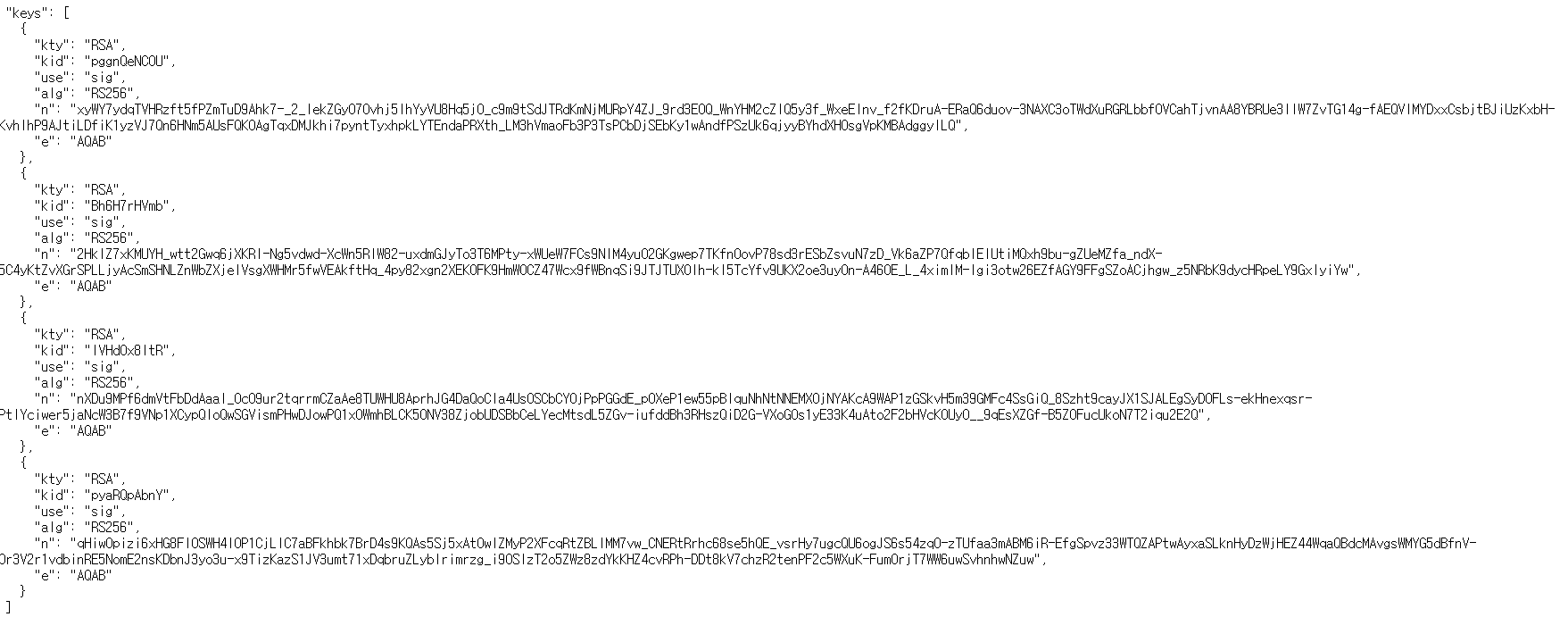
많은 값들 중 kid, alg가 indentity token header에 포함된 kid, alg와 일치하는 key를 사용하면 된다.
JWT의 header 값은 base64로 인코딩 되어있기 때문에 디코딩해보면
{
"kid":"IVHd0xBltR"
"alg": "RS256"
}
위와 같은 값을 가지며 key 배열 중 3번째 정보를 사용하면 된다.
암호화된 알고리즘은 'RS256' 즉, SHA-256을 사용하는 RSA(비대칭키 암호화방식)이기 때문에 n(modulus), e(exponent)로 공개키를 구성한다.
즉, 3번째 정보의 n, e 값을 통해 public key를 생성한뒤 public key로 Identity Token의 서명(signature)을 검증하면 된다.
Apple 공식문서에 따르면 ios에서 사용자 정보를 수신한 응답은 다음과 같은 형태다.
{
  "state" : " ... ",
  "authorizationCode" : " ... “,
  "identityToken" : " ... “,
  "user":"{
    "email" : " ... ",
    ...
  }
}
응갑 값 중 email과 실질적인 sub값(애플 로그인 시 필요한 식별값)을 추출하여 db에 저장해준다.
이후에 로직은 jwt를 이용한다. 서버 측에서 자체 생성한 accessToken과 refreshToken을 발급하여 회원가입과 로그인을 구현해준다.
이제 코드를 살펴보겠다.
Signature 검증하기 (Identity Token 검증하기)
1. 의존성 추가
implementation 'org.springframework.cloud:spring-cloud-starter-openfeign'OpenFeign을 사용할 예정이니 추가해둔다.
2. application.yml 설정
- APPLE_REDIRECT_URL : 설정한 redirect-uri
- APPLE_CLIENT_ID : Services의 Identifier
- APPLE_TEAM_ID : App ID의 Prefix
- APPLE_KEY_ID : Key ID
apple:
  auth:
    token-url: https://appleid.apple.com/auth/token
    public-key-url: https://appleid.apple.com/auth/keys
  redirect-uri: ${APPLE_REDIRECT_URL}
  iss: https://appleid.apple.com
  aud: ${APPLE_CLIENT_ID}
  team-id: ${APPLE_TEAM_ID}
  key:
    id: ${APPLE_KEY_ID}
    path: classpath:/apple/AuthKey_${APPLE_KEY_ID}.p8
3. AppleClient
@FeignClient(name = "appleClient", url = "https://appleid.apple.com/auth")

public interface AppleClient {
    @GetMapping(value = "/keys")
    ApplePublicKeyResponse getAppleAuthPublicKey();


}
@GetMapping(value = "/keys"): HTTP GET 요청을 /keys 엔드포인트로 보낸다. 이 엔드포인트는 Apple의 공개 키(키 배열)를 반환한다.
FeignClient에 대해서는 따로 다음 포스팅에서 자세히 다뤄보겠다.
3. ApplePublicKeyReponseDto
@Getter
public class ApplePublicKeyResponse {
    private List<Key> keys;

    @Getter
    public static class Key {
        private String kty;
        private String kid;
        private String use;
        private String alg;
        private String n;
        private String e;
    }

    //받은 public key 중 kid alg 같은거 찾기
    // Identity Token 헤더에 있는것과비교
    public Key getMatchedKeyBy(String kid, String alg) {
        return keys.stream()
                .filter(key -> key.getKid().equals(kid) && key.getAlg().equals(alg))
                .findAny()
                .orElseThrow(() -> new ExceptionHandler(ErrorStatus.INVALID_APPLE_ID_TOKEN_INFO));
    }
}
key 배열을 가져오기 위한 dto이다.
getMatchedKeyBy는 identity token의 kid, alg 값과 응답과 key배열을 비교하여 일치하는 값을 리턴해준다.
Application 클래스에도
@ImportAutoConfiguration({FeignAutoConfiguration.class})이 어노테이션을 달아준다.
4. Service
private final AppleClient appleAuthClient;
private final ApplePublicKeyGenerator applePublicKeyGenerator;

	public AppleInfo getAppleAccountId(String identityToken){
        Map<String, String> headers = parseIdentityToken(identityToken);
        PublicKey publicKey = applePublicKeyGenerator.generatePublicKey(headers, appleAuthClient.getAppleAuthPublicKey());

        Claims claims = getTokenClaims(identityToken, publicKey);
        log.info("claims : " + claims.toString());

        String email = claims.get("email", String.class);
        String sub = claims.get("sub", String.class);
        log.info("email : " + email + "\nsub : " + sub);

        return new AppleInfo(email, sub);
    }

     public Map<String, String> parseIdentityToken(String token) {
        try {
            String header = token.split("\\.")[0];
            return new ObjectMapper().readValue(decodeHeader(header), Map.class);
        } catch (JsonProcessingException e) {
            throw new ExceptionHandler(ErrorStatus.INVALID_APPLE_ID_TOKEN);
        }
    }

    public String decodeHeader(String token) {
        return new String(Base64.getDecoder().decode(token), StandardCharsets.UTF_8);
    }
5. ApplePublicKeyGenerator
@Component
@RequiredArgsConstructor

public class ApplePublicKeyGenerator {

    public PublicKey generatePublicKey(Map<String,String> tokenHeaders, ApplePublicKeyResponse applePublicKeys) {
        ApplePublicKeyResponse.Key publicKey = applePublicKeys.getMatchedKeyBy(tokenHeaders.get("kid"),tokenHeaders.get("alg"));
        return getPublicKey(publicKey);
    }

    private PublicKey getPublicKey(ApplePublicKeyResponse.Key publicKey) {
        byte[] nBytes = Base64.getUrlDecoder().decode(publicKey.getN());
        byte[] eBytes = Base64.getUrlDecoder().decode(publicKey.getE());

        RSAPublicKeySpec publicKeySpec = new RSAPublicKeySpec(new BigInteger(1, nBytes),
                new BigInteger(1, eBytes));

        try {
            KeyFactory keyFactory = KeyFactory.getInstance(publicKey.getKty());
            return keyFactory.generatePublic(publicKeySpec);

        } catch (NoSuchAlgorithmException | InvalidKeySpecException e) {
            throw new ExceptionHandler(ErrorStatus.PUBLICKEY_ERROR_IN_APPLE_LOGIN);
        }
    }
}
n과 e를 디코딩한 다음 이를 이용해 publickey를 만든다.
이슈!!!!
위와 같이 하고 실행을 했지만,
많은 오류들을 만났다..
그 중 하나가 버전 오류였다
jakarta.servlet.ServletException: Handler dispatch failed: java.lang.AbstractMethodError: Receiver class org.springframework.cloud.openfeign.support.SpringDecoder$FeignResponseAdapter does not define or inherit an implementation of the resolved method 'abstract org.springframework.http.HttpStatusCode getStatusCode()' of interface org.springframework.http.client.ClientHttpResponse.버전이 달라서 생긴 오류이다. 스프링부트 3.x와 openfeign 버전을 잘 매칭시켜 해결했다!

프로그램 실행 시 의존관계를 주입할 bean을 찾지 못해 발생하는 오류이다.
@Configuration
@EnableFeignClients(basePackageClasses = ~~Application.class)
public class FeignClientConfig {
}
@Configuration을 통해 설정 클래스로 알려주었다.
@EnableFeignClients Spring Cloud OpenFeign 클라이언트를 활성화하여 해결했다.!!
다음 포스팅에는 openFeign와 chatgpt api 연결을 포스팅해보겠다.
'Spring Boot' 카테고리의 다른 글
| [Spring Cloud] Eureka Server / Client 구축하기 (0) | 2024.10.15 |
|---|---|
| [Spring JPA] @Where 어노테이션으로 인한 Foreign Key 제약 문제 (2) | 2024.09.12 |
| [Spring boot] JPA +PostgreSQL 연결 (1) | 2024.08.17 |
| [Spring boot] API 문서 자동화를 위한 Swagger 연동 (3) | 2024.01.01 |
| [Spring boot] Web Socket을 활용한 채팅 구현 (5) | 2023.11.22 |